Have you ever tried to get a clear view through a monocular, only to find everything shaking and blurry? It can be frustrating, especially when you’re trying to see something far away or in low light.
That’s where monoculars with image stabilization come in. They’re designed to keep your view steady, making every detail sharp and easy to see. You’ll discover simple steps to use your image-stabilized monocular like a pro. By the end, you’ll know exactly how to enjoy crystal-clear views without the usual shakiness holding you back.
Keep reading, and transform the way you see the world through your monocular.
Choosing The Right Monocular
Choosing the right monocular with image stabilizationmeans checking some key features. Focus on stabilization qualityto reduce shaking. Look for a model with clear opticsand good magnification. Consider the weight and sizefor easy carrying.
Other important features include waterproofand fog-proofdesigns. These help in different weather conditions. Battery life matters too if the stabilization needs power.
| Brand | Model | Magnification | Stabilization Type | Weight |
|---|---|---|---|---|
| Canon | IS 10×30 | 10x | Optical | 330g |
| Nikon | ACULON A30 | 10x | Electronic | 230g |
| Vortex | Solo 10×36 | 10x | Gyro | 400g |

Credit: www.ebay.com
Understanding Image Stabilization
Image stabilizationhelps keep the view steady. It reduces the shaking caused by hand movements. This makes it easier to see distant objects clearly. Inside the monocular, sensors detect motion. Tiny motors then move lenses to balance the shake. This process happens very fast, many times per second.
Users gain many benefits from image stabilization. It improves viewing comfortby reducing eye strain. It also allows for longer observationwithout fatigue. Even at high magnification, images stay sharp and clear. This makes it ideal for bird watching, sports, or surveillance. Less shaking means better photos if the monocular has a camera feature.
Proper Handling Techniques
Hold the monocular firmlywith both hands. This reduces shaking. Keep your elbows close to your body for extra support.
Place the monocular against your eye gently. Avoid pressing too hard. Adjust the focus slowly for a clear view.
- Do not grip too tightly. This causes hand tremors.
- Keep your body steady. Avoid moving while looking.
- Use a strap to prevent dropping.
- Do not cover the lens or buttons accidentally.
Common mistakes to avoid:holding the monocular with one hand only, shaking your hands, and using fast, jerky movements. Staying calm and steady helps the image stay clear.

Credit: www.tiktok.com
Enhancing Viewing Experience
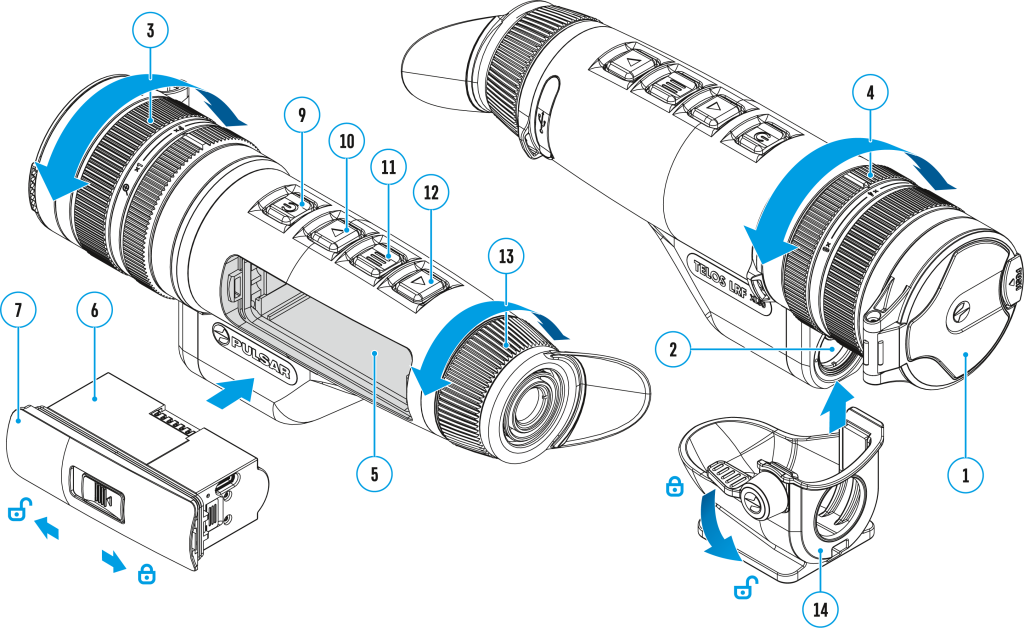
Adjust the focus knobgently until the image is clear. Use the stabilization buttonto reduce shaking. This helps keep the view steady, especially when holding the monocular by hand. Try different stabilization levels to see what works best for you.
Choose calm weatherand good lightingfor the best viewing. Early morning or late afternoon light often gives sharp images. Avoid windy or rainy days, as they make it hard to keep steady.
| Optimal Conditions | Why Important |
|---|---|
| Calm Weather | Reduces shaking and blurring |
| Good Lighting | Improves image clarity |
| Stable Position | Helps hold the monocular steady |
Maintenance And Care
Use a soft, lint-free cloth to clean the lenses gently. Avoid using paper towels or rough fabrics that can scratch the glass. For stubborn dirt, moisten the cloth slightly with lens cleaner or water.
Never spray liquid directly on the lenses. Instead, apply it to the cloth first. Clean the body of the monocular with a dry cloth to remove dust and fingerprints. Keep the lenses covered with caps when not in use to prevent dust buildup.
| Storage Tips | Why It Matters |
|---|---|
| Store in a dry, cool place | Prevents moisture and mold growth |
| Use a padded case | Protects from bumps and scratches |
| Keep away from direct sunlight | Prevents lens damage and fading |
| Remove batteries if unused for long | Avoids battery leaks and corrosion |
Expert Recommendations
Hold the monocular steady to get the clearest view. Use both hands for better control. Keep your elbows close to your body to reduce shaking. Use the image stabilization feature to keep the picture stable, especially when zoomed in. Adjust the focus slowly to avoid blurry images.
Use a tripod or a stable surface for longer viewing sessions. This helps reduce fatigue and improves image quality. Remember to clean the lenses regularly with a soft cloth. Avoid touching the glass directly to keep it clear and sharp.
| Troubleshooting Issue | Possible Cause | Solution |
|---|---|---|
| Blurry image | Incorrect focus | Adjust the focus wheel slowly |
| Image shakes a lot | Hand movement too strong | Hold steady or use a tripod |
| Image stabilization not working | Battery low or dead | Replace or recharge battery |
| Dark or dim image | Dirty lenses or low light | Clean lenses and increase light |

Credit: www.amazon.com
Frequently Asked Questions
What Is Image Stabilization In Monoculars?
Image stabilization reduces shake and blur in monoculars. It uses technology to steady your view, especially when handheld or in motion. This feature enhances clarity and comfort during extended use, making distant objects easier to see clearly.
How Do I Activate Image Stabilization On Monoculars?
To activate image stabilization, usually press the dedicated stabilization button. Some models may require switching a toggle or holding the device steady briefly. Always check your monocular’s manual for exact instructions to ensure proper function.
Can Image Stabilization Improve Night Viewing?
Yes, image stabilization helps night viewing by reducing hand tremors. It stabilizes the image, making faint objects clearer in low light. This feature is essential for stargazing or wildlife observation after dark.
Does Image Stabilization Consume More Battery Power?
Yes, image stabilization uses extra battery power. It requires energy to operate the stabilization motors or sensors. Carry spare batteries for longer sessions, especially during outdoor activities.
Conclusion
Using monoculars with image stabilization makes viewing clearer and steadier. Hold the device firmly and focus slowly for the best results. Practice helps you get comfortable and improves your skills. Enjoy sharp images even when your hands shake or when moving.
This tool suits bird watchers, hikers, and anyone needing clear distant views. Keep your monocular clean and store it safely to last longer. Simple steps lead to better experiences with your monoculars. Try these tips and see the difference yourself.