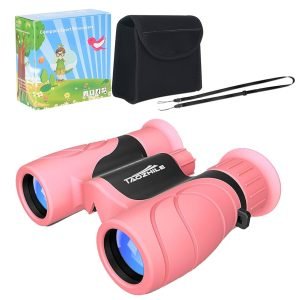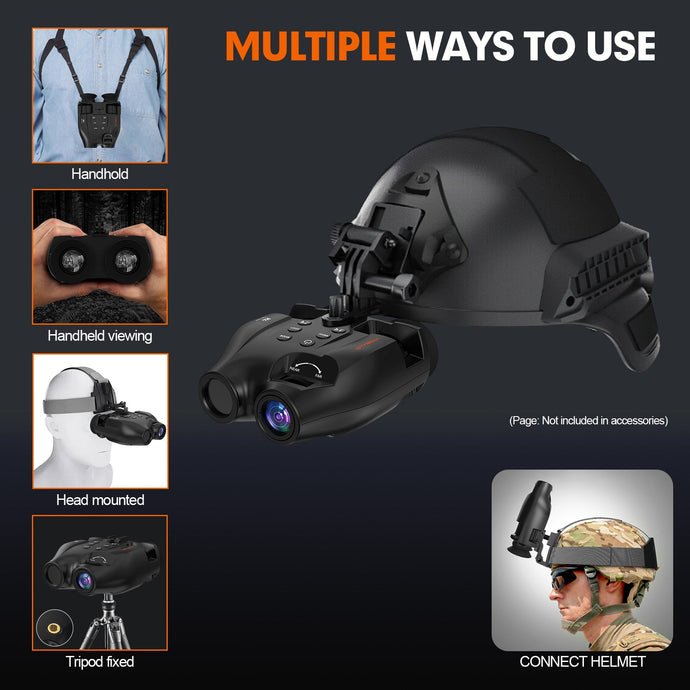
Have you ever wished you could see clearly in the dark using just your smartphone? Imagine turning your phone into a powerful night vision tool that lets you explore the night like never before.
Whether you’re into wildlife watching, security, or just curious about the hidden world after sunset, learning how to use night vision scopes with your smartphone can open up a whole new experience. In this guide, you’ll discover simple steps and tips that make night vision easy and accessible.
Ready to unlock the secrets of the night with your phone? Keep reading to find out how.
Choosing The Right Night Vision Scope
Night vision scopes use different technologies. The main types are Image Intensification and Thermal Imaging. Image intensification is common. It helps to see in the dark by amplifying light. Thermal imaging detects heat and works well in total darkness. Each has its own advantages.
Not all night vision scopes work with smartphones. Check if the scope has a smartphone adapter. This lets you connect easily. Some scopes have built-in Wi-Fi. This feature helps share images directly to the phone. Read the specifications carefully.
- Resolution: Clear images are important.
- Range: Decide how far you need to see.
- Battery Life: Longer life means more use time.
- Weight: Lightweight scopes are easier to carry.
Preparing Your Smartphone For Night Vision
Several apps and softwarecan improve your smartphone’s night vision. Choose apps that allow manual control of the camera settings. Look for features like brightness adjustment, ISO control, and low-light filters. Some apps also offer infrared camera supportfor better night viewing.
Adjust your smartphone camera settings for best results. Increase the exposure timeto let more light in. Lower the ISOto reduce noise and grain. Turn off the flashto avoid glare. Use manual focusto keep the image sharp in the dark.
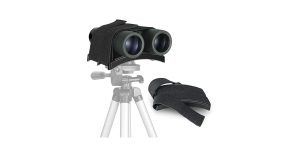
Proper mounting is key for steady images. Use a smartphone holderdesigned for night vision scopes. Ensure the phone camera aligns well with the scope lens. A stable tripodhelps keep the phone and scope steady during use. Check the mount often to avoid shifting or misalignment.
Mounting And Aligning The Scope
Adapters and mounts help attach the night vision scope to your smartphone. Choose an adapter that fits both devices well. This keeps the scope steady and in the right place.
Align the scope lens exactly with the smartphone camera lens. Small adjustments may be needed for a clear image. Check the view on your phone screen and move the scope slightly until the image is sharp.
- Use clamps or screws to hold the scope firmly.
- Make sure the setup does not move during use.
- Soft padding can protect both devices from scratches.
- A tripod can add extra stability for steady shots.

Credit: www.usnighthawk.com
Capturing Clear Night Vision Images And Videos
Adjusting the focuson your night vision scope is key for clear images. Use your smartphone’s camera app to tap and set focus on your subject. Exposurecontrols how bright or dark your photo is. Lower the exposure to avoid washed-out images. Some apps let you lock focus and exposure for steady shots.
Using additional lighting toolslike infrared illuminators can enhance visibility without disturbing the scene. These lights work well with night vision scopes and help capture more detail. Avoid using bright lights that can cause glare or ruin night vision effects.
- Hold your phone steady or use a tripod.
- Use a remote shutter or timer to reduce shaking.
- Keep your hands close to your body for better stability.
- Practice smooth, slow movements when filming video.
Common Challenges And Solutions
Glare and reflectionscan ruin night vision images. Use a lens hoodor a rubber eyecup to block stray light. Position the smartphone and scope to avoid bright light sources behind you. Clean both lenses gently to remove smudges that cause reflections.
Low batteryis a common problem. Carry extra batteriesor a power bank for your smartphone. Turn off unused apps and lower screen brightness to save power. Some scopes use their own power source; check battery life before use.
Image quality can suffer due to focus issues, dirt, or poor alignment. Make sure the smartphone camera lens and scope lens are clean. Adjust the focus on both devices carefully. Use a stable mount or tripod to keep the setup steady. Check that the smartphone camera aligns well with the scope’s eyepiece.

Credit: www.amazon.com
Maintaining And Caring For Your Setup
Cleaning the lens and scope keeps your view clear and sharp. Use a soft, lint-free cloth for the lens. Avoid rough materials that can scratch the glass. For stubborn dirt, a small amount of lens cleaner works well. Wipe gently in a circular motion to prevent damage.
Storage is key to protect your setup from dust and moisture. Store your night vision scope in a cool, dry place. Use a protective case to avoid bumps and scratches. Keep it away from direct sunlight to prevent lens damage.
Regular calibration checks help maintain accuracy. Test your scope often to ensure it aligns correctly with your smartphone. Small adjustments improve image quality and targeting. Calibration tools or apps can assist in this process.
Creative Uses For Night Vision With Smartphones
Night vision scopes can help you see animals in the dark. Use your smartphone with the scope to watch wildlife quietly. Capture clear images without scaring animals away. Great for spotting owls, deer, or foxes at night.
Use night vision for home or business safety. Attach your phone to the scope and check dark areas easily. Watch for any unusual movement or sounds. A simple way to keep your space secure without extra lights.
Take unique night photos and videos using your smartphone with the scope. Get cool shots of the moon, stars, or night scenes. Perfect for creative projects or sharing with friends.

Credit: www.amazon.com
Frequently Asked Questions
How Do Night Vision Scopes Connect To Smartphones?
Night vision scopes usually connect via a smartphone adapter or Wi-Fi. The adapter aligns the scope’s lens with the phone camera. Some models use apps for live streaming or recording. Always check compatibility before purchase for seamless connection.
Can I Record Videos Using Night Vision Scopes On Phones?
Yes, most night vision scopes allow video recording on smartphones. Use the scope’s companion app or your phone’s camera app. Ensure stable mounting for clear footage. Battery life and storage space affect recording duration.
Are All Smartphones Compatible With Night Vision Scopes?
Not all smartphones fit every night vision scope. Compatibility depends on phone size, camera placement, and adapter type. Check manufacturer guidelines before buying. Some scopes offer adjustable mounts to fit various phone models.
What Apps Enhance Night Vision Scope Functionality On Phones?
Many night vision scopes come with dedicated apps for control and recording. Popular apps offer features like zoom, brightness adjustment, and video capture. Choose apps compatible with your scope and smartphone for best performance.
Conclusion
Using night vision scopes with smartphones can improve your night shots. Attach the scope carefully for clear images. Adjust settings to match the environment. Practice often to get steady and sharp pictures. This setup helps you see and capture in low light.
Enjoy exploring the dark with your phone’s new ability. Stay safe and respect nature while using your gear. Night photography becomes easier and more fun this way. Keep experimenting and learning for better results each time.