Are your night vision binoculars starting to lose their glow? Replacing the batteries might be the simple fix you need.
But if you’re unsure how to do it without damaging your gear, you’re in the right place. This guide will walk you through each step clearly and easily. By the end, you’ll feel confident to handle the task yourself and get your night vision binoculars back to working perfectly.
Keep reading to unlock the secret to clear, bright night views again!
Types Of Night Vision Binocular Batteries
Night vision binoculars use different battery types like AA, CR123, or rechargeable ones. Choosing the right battery ensures longer use and better performance. Changing batteries is simple with the correct size and careful handling.
Common Battery Models
- AA batteries are very popular. Easy to find everywhere.
- CR123 batteries are smaller. They last longer.
- Rechargeable lithium-ion batteries are eco-friendly. They save money.
Battery Lifespan Expectations
AA batteries last up to 10 hours. It depends on usage. CR123 batteries can last 20 hours. They are more reliable. Rechargeable batteries last 8 hours. They need charging often. It’s smart to carry extra batteries. Night vision uses energy fast.

Credit: www.amazon.com
Tools Needed For Replacement
Some basic toolsmake battery replacement easier and safer. A small screwdriveris often needed to open the battery compartment. Use a clean clothto wipe the area before inserting new batteries. A pair of tweezershelps to remove old batteries without touching delicate parts.
Optional accessories like battery testerscan check if the new batteries work well. A soft brushcan clean dust from inside the binoculars. Keep a small containernearby to store old batteries safely.
| Essential Tools | Optional Accessories |
|---|---|
| Small screwdriver | Battery tester |
| Clean cloth | Soft brush |
| Tweezers | Storage container for old batteries |
Preparing Your Binoculars
Turn off the binoculars to avoid damage or short circuits. Hold the power button until the device shuts down completely. This step protects the internal parts during battery replacement.
Use a soft cloth or brush to clean the outer surface gently. Remove dust and dirt around the battery compartment before opening it. Cleanliness helps prevent debris from entering inside.
Locating The Battery Compartment
The battery compartmentis usually found on the side or bottom of night vision binoculars. It is often marked with a small icon or label. Most binoculars use AA or AAA batteries, but some models require special rechargeable ones.
Battery compartments typically have one of these opening mechanisms:
- Twist cap:Turn the cover counterclockwise to open.
- Slide cover:Push or slide the cover to reveal the compartment.
- Latch or clip:Press or lift a small latch to open.
Always check for a rubber sealaround the compartment. It keeps moisture out and protects the batteries. Be gentle while opening to avoid damage.
Removing Old Batteries
Remove the battery cover gently to avoid damage. Use clean, dry hands to prevent moisture from harming the device. Hold the binoculars steady while removing batteries to stop them from falling out. Pull out batteries carefully, avoiding sharp tools that could puncture them.
Place old batteries in a safe container to avoid leaks. Keep batteries away from metal objects to stop short circuits. Wash your hands after handling old batteries to remove any residue.
| Disposing of Used Batteries | Why It Matters |
|---|---|
| Recycle at designated centers | Prevents harmful chemicals from polluting the environment |
| Do not throw in regular trash | Reduces fire risks and toxic leaks |
| Follow local disposal rules | Keeps community safe and clean |

Credit: manuals.plus
Inserting New Batteries
Check the battery compartmentfor the correct orientation. Usually, there are plus (+)and minus (-)signs to guide placement. Insert the batteries following these signs carefully. Incorrect placement may damagethe device or cause it to not work.
Make sure the batteries fit snuglyin their slots. Loose batteries can cause power interruptionsand affect performance. If needed, clean the contacts with a soft cloth for a better connection.
- Match battery ends to the symbols inside the compartment.
- Push batteries gently until they are secure.
- Close the compartment firmly to avoid gaps.
- Test the binoculars to confirm power is steady.
Testing Functionality After Replacement
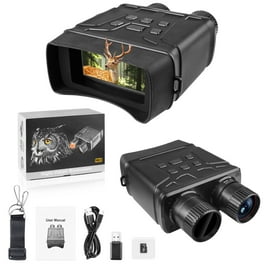
After replacing the batteries, turn onthe night vision binoculars to check power. The device should light up or show a clear image. If the screen stays dark, recheckthe battery placement and connections.
Look for any flickeringor dim images. This might mean low battery power or poor contact. Make sure batteries are fresh and inserted the right way. Clean battery contacts gently if needed.
- Check battery orientation for proper + and – alignment.
- Replace batteries with new ones if image is weak.
- Clean the battery compartment to remove dust or corrosion.
- Try using different batteries to rule out faulty ones.
- Ensure battery cover is tightly closed to maintain connection.
Sometimes, the device may need a restart. Turn it off, wait a few seconds, then turn it back on. Persistent issues might require professional help.
Credit: www.walmart.com
Maintaining Battery Health
Store batteries in a cool, dry place away from sunlight. Avoid extreme temperatures, which can shorten battery life. Remove batteries if you won’t use binoculars for a long time. This prevents leakage and damage.
Check batteries often for signs of corrosion or leaks. Replace batteries immediately if they look swollen or damaged. Always use the recommended battery type for your binoculars.
| When to Replace Batteries | Signs to Watch For |
|---|---|
| Night vision dims or flickers | Battery runs out quickly |
| Device fails to turn on | Visible corrosion or swelling |
| Routine replacement every 6-12 months | Battery expiration date reached |
Frequently Asked Questions
How Do I Safely Remove Old Batteries From Night Vision Binoculars?
To safely remove old batteries, first turn off the binoculars. Open the battery compartment carefully, avoiding force. Gently take out the batteries to prevent damage or leaks. Dispose of them following local regulations for hazardous waste.
What Type Of Batteries Do Night Vision Binoculars Use?
Most night vision binoculars use AA or CR123 lithium batteries. Always check the user manual for specific battery types. Using the correct batteries ensures optimal performance and prevents damage to the device.
How Often Should I Replace Batteries In Night Vision Binoculars?
Battery replacement depends on usage frequency and battery type. Typically, replace batteries every 8 to 12 hours of continuous use. Always monitor battery life indicators and replace batteries before they fully drain.
Can Rechargeable Batteries Be Used In Night Vision Binoculars?
Yes, many night vision binoculars support rechargeable batteries. Ensure compatibility by consulting the user manual. Rechargeable batteries save money and reduce waste but monitor their charge capacity regularly.
Conclusion
Replacing batteries in night vision binoculars is simple and quick. Always check the battery type before starting. Keep the device clean and dry while changing batteries. Avoid mixing old and new batteries for best performance. Proper battery care helps your binoculars last longer.
Now, you can enjoy clear night views anytime. Remember, a little care goes a long way. Stay prepared and confident during your nighttime adventures.