Have you ever struggled to capture clear, close-up shots at a concert because you’re too far from the stage? What if you could get crystal-clear images without needing the most expensive camera lenses?
Using zoom binoculars for concert photography might be your secret weapon. In this guide, you’ll discover simple tricks to make the most of your binoculars and take stunning photos that stand out. Ready to transform your concert shots and impress your friends?
Keep reading—you won’t want to miss these easy, game-changing tips.
Choosing The Right Zoom Binoculars
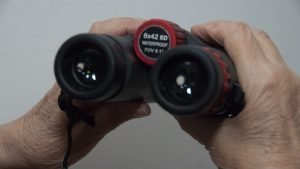
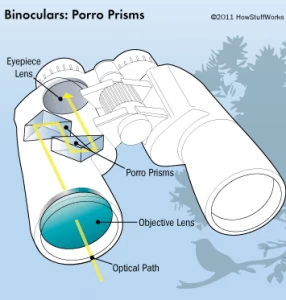
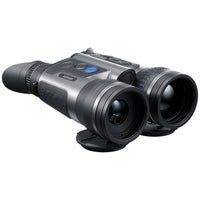
Choosing zoom binoculars with clear lenses and adjustable focus helps capture sharp concert photos. Compact, lightweight designs offer easy handling in crowded venues. Select binoculars with smooth zoom for quick changes between close and wide shots.
Magnification And Lens Size
Zoom binoculars should have the right magnification. High magnification allows you to see far objects clearly. But too high magnification can make images blurry. Lens size is also important. Larger lenses gather more light. This helps in low light settings. Choose a balance between magnification and lens size for clear photos.
Image Stabilization Features
Image stabilization is crucial. It keeps images steady even if your hands shake. Look for binoculars with built-in stabilization. This feature helps in capturing sharp pictures. It reduces motion blur. Stabilization is important during long concerts.
Ergonomics And Weight
Ergonomics make holding binoculars easy. Comfortable grip is important. Lightweight binoculars are easy to carry. Heavy binoculars can be tiring during concerts. Choose binoculars that feel good in your hands. Comfort and ease of use matter in long events.

Credit: apps.apple.com
Preparing Your Equipment
Keep your zoom binoculars clean for clear photos. Use a soft cloth to wipe lenses gently. Avoid harsh chemicals to protect lens coatings. Check for dust or smudges before each use.
Attach camera adapters carefully. Make sure they fit snugly to avoid shaking. Align the adapter with the binocular eyepiece for a clear view. Secure screws without overtightening to prevent damage.
Using a tripod or support helps steady your shots. Choose a stable tripod that can hold your equipment’s weight. Adjust height and angle for the best framing. Use quick-release plates for easy setup and removal.
Camera Settings For Concerts
ISOcontrols your camera’s light sensitivity. Set it low to avoid grainy photos but increase it in dark concerts. Shutter speedmust be fast to capture quick movements. A speed of 1/250 or faster helps freeze action.
Apertureaffects how much light enters the lens. Use a wide aperture (small f-number) to get bright pictures and blur the background. Focus modeshould be on continuous or AI servo to keep moving performers sharp.
Adjust white balanceto match stage lighting colors. Use presets like tungsten or fluorescent. You can also set it manually for more natural skin tones. This keeps colors true and lively in your photos.
Techniques For Using Zoom Binoculars
Framing and compositionare key to good concert photos with zoom binoculars. Focus on the main subject. Keep the frame clean and simple. Avoid clutter in the background. Use the zoom feature to fill the frame with the performer.
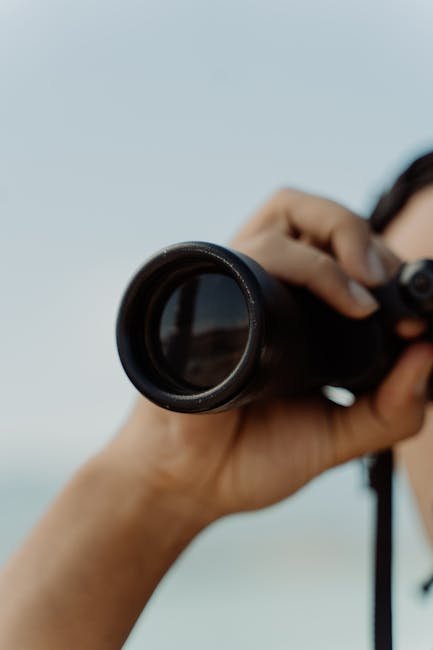
Stabilizing your shotsis crucial. Hold binoculars with both hands. Rest your elbows on a solid surface if possible. Use a neck strap to reduce shaking. A steady shot prevents blurry images.
Adjusting zoom smoothlyhelps capture sharp images. Turn the zoom knob gently. Avoid quick zoom changes that cause blur. Find the perfect zoom level before taking the shot. Smooth zooming keeps focus steady on the subject.
Dealing With Low Light Conditions
Fast lenseshelp capture more light in dark concert settings. They allow more light to reach the camera sensor. This reduces blur and keeps images sharp. Use lenses with wide apertureslike f/1.8 or f/2.8 for better results.
To reduce noise, use a low ISO setting. Higher ISO adds grain to photos. Use noise reduction software to clean up images after shooting. Shooting in RAW format helps keep details during editing.
Use available lightsuch as stage lights or spotlights. Position yourself to catch the best light angles. Avoid using flash as it can disturb performers and audience. Light from screens or phones can also add interesting effects.

Credit: apps.apple.com
Capturing Dynamic Moments
Zoom binoculars help capture clear shots of fast concert moments. Anticipate actionby watching the performers closely. Expect sudden moves and quick changes in pose.
Continuous shooting modelets you take many photos quickly. This increases chances to get the perfect shot. Hold the shutter button and let the camera work.
Panning techniqueskeep moving subjects sharp. Move your camera along with the performer’s movement. This reduces blur and shows motion well.
- Use smooth, steady hand movements when panning.
- Practice following the subject before the concert.
- Combine zoom binoculars with a fast shutter speed.
Post-processing Tips
Enhancing sharpnesshelps make your concert photos clearer. Use photo editing tools to increase sharpness carefully. Avoid too much sharpening to keep the image natural. Focus on the main subject to draw attention.
Color correctionbrings life back to your photos. Adjust brightness and contrast to fix dull colors. Use tools to balance white color for accurate skin tones and lighting. This makes the image more real and pleasing.
Cropping for impactlets you focus on the most exciting part of the photo. Cut out distractions around the edges. Keep the subject big and clear. A good crop can make your photo more powerful and interesting.

Credit: apps.apple.com
Avoiding Common Mistakes
Over-zoomingcan cause blurry photos and shaky images. Zoom in only as much as needed. Too much zoom makes it hard to keep steady. Use moderate zoom levelsto keep pictures clear and sharp.
Ignoring stability leads to blurry shots. Hold your binoculars and camera firmly. Use a tripod or rest your arms on a solid surface. This reduces shakingand helps capture better photos.
Neglecting camera settings affects photo quality. Adjust the focus, ISO, and shutter speedfor low light. Concerts are dark, so use settings that work well in dim places. This helps to get bright and clear images.
Frequently Asked Questions
How Do Zoom Binoculars Improve Concert Photography?
Zoom binoculars help capture distant subjects clearly. They provide variable magnification, allowing close-up shots without disturbing the crowd. This enhances image detail and composition, making concert photos more vivid and engaging.
Can I Use Zoom Binoculars With My Camera?
Yes, many zoom binoculars can attach to cameras using adapters. This setup enables better zoom capabilities and stability for concert shots. Check compatibility before purchase to ensure seamless integration with your camera.
What Zoom Level Is Best For Concert Photography?
A zoom range of 8x to 12x is ideal for concerts. It offers a balance between magnification and image stability. Higher zooms may cause shaky images without proper support like tripods or monopods.
How To Stabilize Zoom Binocular Shots At Concerts?
Use a tripod or monopod to reduce shaking. Hold binoculars firmly and use image stabilization if available. Stable shots improve photo clarity, especially in low-light concert environments.
Conclusion
Zoom binoculars help you capture clear concert photos from far away. Adjust the zoom carefully to focus on your subject. Hold your camera steady to avoid blurry shots. Practice using your binoculars before the event for better results. With patience and effort, your concert photos will improve.
Enjoy the music and the moment while shooting. Keep experimenting to find your best angles and settings. This simple tool can make concert photography more fun and rewarding.