If your night vision monocular isn’t detecting far objects, it’s likely due to limited range, poor lighting, or environmental interference. Understanding your device’s specs and optimizing usage conditions can dramatically improve performance.
Key Takeaways
- Detection range is limited by generation and specs: Higher-gen night vision offers better range, but even top models have distance limits.
- Low ambient light reduces effectiveness: Night vision needs some light—starlight or moonlight—to amplify; total darkness hampers performance.
- Weather and atmospheric conditions matter: Fog, rain, smoke, and humidity scatter light and reduce visibility at distance.
- Lens quality and focus settings affect clarity: Dirty lenses or incorrect focus can make distant objects appear blurry or invisible.
- IR illuminators extend range but have limits: Built-in or external IR lights help, but their beam narrows and dims over distance.
- User technique impacts detection: Proper handling, steady aiming, and scanning methods improve your ability to spot far-off targets.
- Device age and maintenance play a role: Worn-out tubes or damaged components degrade performance over time.
📑 Table of Contents
- Why Is Night Vision Monocular Not Detecting Far Objects?
- Understanding Night Vision Technology and Range Limits
- The Role of Ambient Light in Detection Range
- Environmental Factors That Reduce Visibility
- IR Illuminators: Helpful but Limited
- Lens Quality, Focus, and Maintenance
- User Technique and Best Practices
- When to Upgrade or Replace Your Monocular
- Conclusion
Why Is Night Vision Monocular Not Detecting Far Objects?
You’re out under a starry sky, scanning the horizon with your night vision monocular, hoping to spot wildlife or secure your perimeter—but distant objects remain fuzzy or completely invisible. Frustrating, right? You’re not alone. Many users face this issue, assuming their device is broken when, in reality, several common factors are at play.
Night vision technology is impressive, but it’s not magic. It doesn’t “see in total darkness” like a superhero’s vision. Instead, it amplifies available light—such as moonlight, starlight, or infrared (IR) illumination—to create a visible image. When distant objects aren’t detected, it’s usually not a defect, but a limitation of physics, environment, or user setup. Understanding these factors can help you get the most out of your monocular and avoid disappointment in the field.
In this guide, we’ll break down the most common reasons your night vision monocular isn’t picking up faraway objects—and what you can do about it. Whether you’re a hunter, security professional, or outdoor enthusiast, these insights will help you troubleshoot and optimize your gear.
Understanding Night Vision Technology and Range Limits
To solve the problem, you first need to understand how night vision works. Most consumer-grade night vision monoculars use image intensifier tubes (Gen 1, Gen 2, or Gen 3) that capture low levels of light and amplify them thousands of times. The higher the generation, the better the sensitivity and range—but even Gen 3 devices have practical limits.
Generation Matters
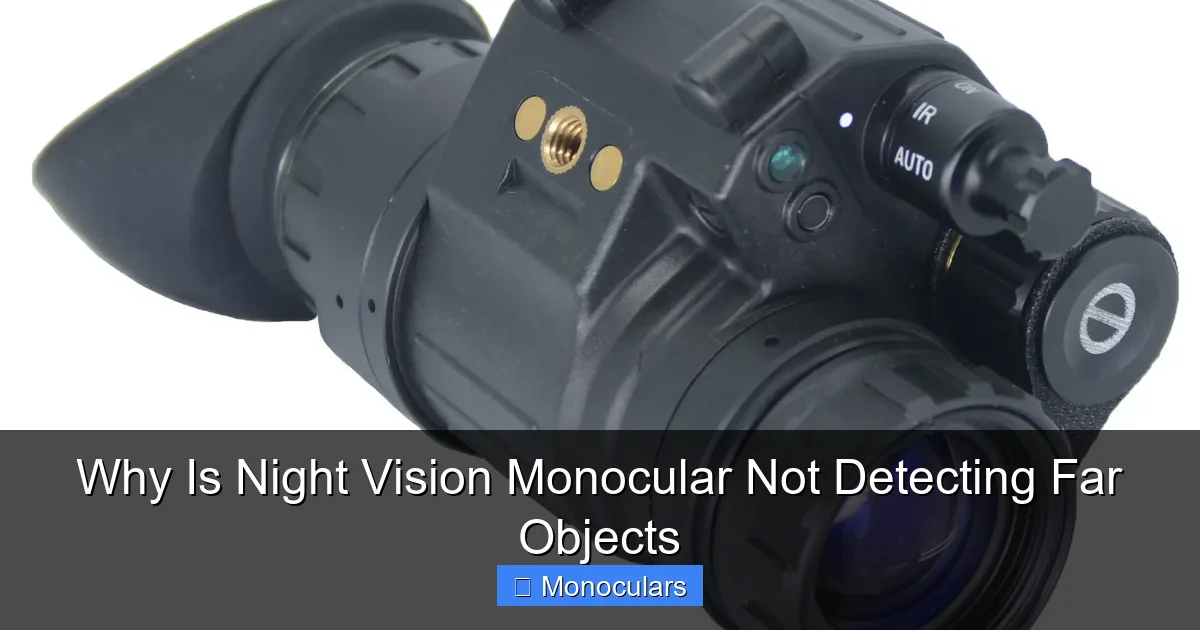
Gen 1 monoculars typically detect objects up to 75–100 yards under ideal conditions. Gen 2 can reach 150–200 yards, while Gen 3 may extend beyond 300 yards. If you’re trying to spot something 250 yards away with a Gen 1 device, you’re pushing its limits. Always check your monocular’s specifications for its rated detection range.
Visual guide about Why Is Night Vision Monocular Not Detecting Far Objects
Image source: imrorwxhmjnklm5p-static.micyjz.com
Resolution and Magnification
Even with good light amplification, resolution plays a big role. A monocular with low resolution (e.g., 350–450 lines per inch) will struggle to resolve fine details at distance. Magnification also matters—higher zoom can bring distant objects closer, but it narrows your field of view and amplifies shake, making steady aiming harder.
Real-World Example
Imagine using a Gen 1 monocular with 3x magnification to scan a forest edge at night. At 100 yards, a deer might appear as a faint green blob. At 150 yards, it could vanish entirely—not because the device failed, but because the light reflected from the deer is too weak to be amplified clearly.
The Role of Ambient Light in Detection Range
Night vision doesn’t work in absolute darkness. It needs some source of light to amplify. If there’s no moonlight, starlight, or artificial light, your monocular can’t generate a usable image—no matter how advanced it is.
Moonlight and Starlight Are Key
On a clear, moonlit night, even basic night vision devices perform well. But on an overcast or moonless night, visibility drops significantly. Starlight alone provides minimal illumination—enough for Gen 2 or Gen 3 devices to function, but not always at long range.
Urban vs. Rural Lighting
In rural areas, distant objects may be backlit by city glow or distant streetlights, which helps. But in truly remote locations, the lack of ambient light becomes a major hurdle. If you’re deep in the woods with no light sources, your monocular’s range shrinks dramatically.
Tip: Use a Red Filter or Headlamp
Preserve your night vision by using a red-filtered flashlight when moving. White light resets your eyes’ adaptation and reduces the monocular’s effectiveness. A red headlamp lets you read maps or adjust settings without killing your night vision.
Environmental Factors That Reduce Visibility
Even with perfect gear and ideal light, Mother Nature can interfere. Weather and atmospheric conditions scatter and absorb light, reducing how far your monocular can see.
Fog, Rain, and Humidity
Moisture in the air—like fog, mist, or light rain—scatters light particles, creating a hazy effect. This is called atmospheric attenuation. Even a light fog can cut your detection range in half. Humidity also plays a role; high humidity increases light scattering, especially over long distances.
Smoke, Dust, and Pollution
Wildfire smoke, dust storms, or industrial pollution can severely limit visibility. These particles absorb and reflect light unpredictably, making distant objects appear washed out or completely hidden. In such conditions, even high-end night vision gear struggles.
Practical Example
Suppose you’re using your monocular during a light drizzle. You notice that objects beyond 100 yards are blurry. Switching to an IR illuminator helps slightly, but the rain still diffuses the beam. This isn’t a gear flaw—it’s physics. Waiting for clearer conditions or moving closer may be your best bet.
IR Illuminators: Helpful but Limited
Many night vision monoculars come with built-in infrared (IR) illuminators—essentially invisible flashlights that emit IR light. These can extend your range in low-light conditions, but they’re not a magic solution.
How IR Illuminators Work
IR light is invisible to the human eye but detectable by night vision devices. When you turn on the illuminator, it casts a beam of IR light onto your target. The monocular then amplifies this reflected light, creating a brighter image.
Range and Beam Spread
Most built-in IR illuminators have a range of 50–150 yards, depending on power and lens design. Beyond that, the beam spreads and dims, reducing effectiveness. External IR illuminators with higher power (e.g., 850nm or 940nm) can reach farther but may require separate mounting and batteries.
Tip: Aim the IR Beam Correctly
Misaligned IR illuminators are a common issue. If the beam isn’t aligned with your monocular’s lens, you’ll see a dark spot in the center of your view. Adjust the illuminator’s angle so the beam covers your field of view. Some models allow manual adjustment; others may need professional calibration.
Warning: IR Can Be Detected
While IR light is invisible to the naked eye, other night vision devices can detect it. In security or tactical situations, using an IR illuminator can give away your position. Use it sparingly and only when necessary.
Lens Quality, Focus, and Maintenance
Even the best night vision tech fails if the optics aren’t up to par. Dirty lenses, incorrect focus, or damaged components can make distant objects disappear.
Clean Your Lens Regularly
Fingerprints, dust, and moisture on the lens reduce light transmission and create glare. Use a microfiber cloth and lens cleaner designed for optics. Avoid paper towels or clothing, which can scratch the lens coating.
Adjust Focus Properly
Many monoculars have a focus wheel. If it’s set for close range, distant objects will appear blurry. Turn the focus wheel slowly while looking at a far object until it sharpens. Some models have diopter adjustments for individual eye focus—don’t skip this step.
Check for Internal Fogging or Damage
Over time, moisture can seep into the monocular, causing internal fogging. This blocks light and degrades image quality. If your device fogs up frequently, it may have a seal failure. Store it in a dry place and consider using desiccant packs.
Example: Blurry Image at Distance
You’re scanning a field and notice that trees 200 yards away are fuzzy. You clean the lens—no change. Then you adjust the focus wheel—suddenly, the trees snap into sharp detail. Simple fix, big impact.
User Technique and Best Practices
Your skill matters just as much as your gear. How you hold, scan, and interpret the image affects detection success.
Steady Your Aim
Handheld monoculars magnify shake. Use a tripod, rest your elbow on a stable surface, or brace against a tree. Even small movements blur distant objects.
Scan Slowly and Systematically
Don’t rush. Move the monocular in slow, overlapping sweeps. Pause briefly on areas of interest. Your brain needs time to process the green-hued image and detect subtle movements.
Use Peripheral Vision
Your peripheral vision is more sensitive to motion and low light. Instead of staring directly at a spot, use your side vision to detect movement—then center the monocular for detail.
Know Your Terrain
Familiarity with the area helps. If you know where game trails or access points are, you can focus your scanning there. Random scanning wastes time and reduces detection chances.
When to Upgrade or Replace Your Monocular
If you’ve tried everything and still can’t detect far objects, it might be time to consider an upgrade.
Signs It’s Time for a New Device
- Image is consistently grainy or dark, even in good light
- IR illuminator doesn’t work or is very weak
- Focus won’t adjust properly
- Internal components are damaged or fogged
- Your needs have outgrown the device’s specs
What to Look for in an Upgrade
Consider a Gen 2+ monocular with higher resolution (640×480 or better), digital night vision with video output, or a model with adjustable IR power. Thermal monoculars are another option—they detect heat signatures and aren’t limited by light, though they’re more expensive.
Conclusion
If your night vision monocular isn’t detecting far objects, don’t assume it’s broken. More often than not, the issue lies in environmental conditions, lighting, user technique, or the device’s inherent limitations. By understanding how night vision works and optimizing your setup—cleaning lenses, using IR wisely, adjusting focus, and scanning properly—you can significantly improve performance.
Remember: night vision isn’t about seeing everything in total darkness. It’s about making the most of available light. Match your expectations to your gear’s capabilities, and you’ll get far better results. Whether you’re scouting game, securing property, or exploring the night, a little knowledge goes a long way.
Frequently Asked Questions
Why can’t my night vision monocular see far in total darkness?
Night vision devices need some light to amplify. In total darkness, there’s nothing to amplify, so the image appears black. Use an IR illuminator or wait for moonlight to improve visibility.
Does weather affect night vision range?
Yes. Fog, rain, smoke, and high humidity scatter light and reduce how far you can see. Even light mist can cut detection range significantly.
Can I increase my monocular’s detection range?
Yes, by using a more powerful IR illuminator, cleaning the lens, adjusting focus, and scanning in good lighting conditions. Upgrading to a higher-gen device also helps.
Why is my night vision image blurry at distance?
This is often due to incorrect focus. Turn the focus wheel slowly while looking at a distant object until it sharpens. Dirty lenses can also cause blurriness.
Is it safe to use an IR illuminator?
Yes, but be cautious. While invisible to the naked eye, IR light can be detected by other night vision devices. Avoid using it in tactical situations where stealth is critical.
How often should I clean my night vision lens?
Clean the lens whenever you notice smudges, dust, or reduced clarity. Use a microfiber cloth and optical cleaner—avoid harsh materials that can scratch the lens.