Have you ever wished you could capture the incredible views you see through your tactical binoculars directly on your smartphone? Imagine turning those distant scenes into sharp photos or videos without missing a single detail.
Using tactical binoculars with smartphone adapters lets you do just that—combining powerful optics with your phone’s camera for amazing results. In this guide, you’ll discover simple steps to set up and use your binoculars with a smartphone adapter, unlocking a whole new way to explore, record, and share the world around you.
Ready to enhance your outdoor adventures and never miss a moment? Keep reading to learn how.
Choosing The Right Tactical Binoculars
Choosing the right tactical binocularsdepends on several important factors. Size and weight matter for easy carrying. Look for clear lenseswith good magnification, usually between 8x and 12x. Waterproof and fog-proof features help in all weather conditions. A wide field of view lets you see more area at once. Consider if the binoculars have built-in image stabilizationfor steady viewing.
Smartphone adapters must fit well with your binoculars. Check compatibility before buying. The adapter should hold the phone steady for clear photos and videos.
| Brand | Model | Key Features |
|---|---|---|
| Vortex | Viper HD | High clarity, waterproof, good for beginners |
| Nikon | Monarch 7 | Wide field of view, lightweight, durable |
| Bushnell | Engage Tactical | Image stabilization, rugged design, easy focus |

Credit: www.youtube.com
Understanding Smartphone Adapters
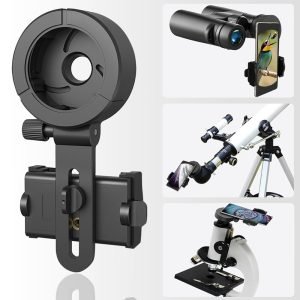
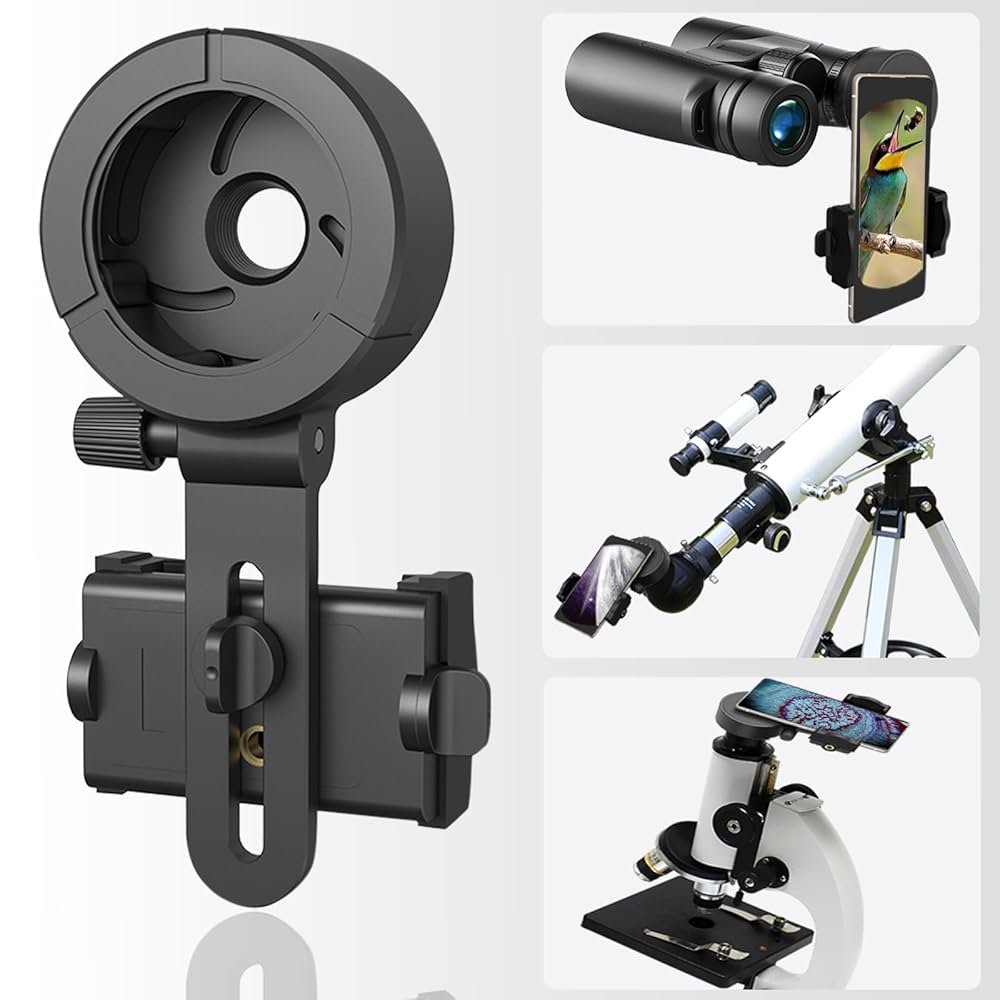
Smartphone adapters let you attach your phone to tactical binoculars. This helps you take clear photos or videos through the binoculars. Adapters come in different types to fit various needs and devices.
- Clip-on adapters: Easy to attach. They clip onto your phone and align with the binocular eyepiece.
- Universal adapters: Adjustable to fit many phone sizes and binocular models.
- Custom adapters: Made for specific phone and binocular brands for perfect fit.
Not all adapters fit every phone. Check the compatibilitybefore buying. Most adapters work with popular smartphones like iPhones and Androids. Some may not fit phones with thick cases or large lenses.
| Adapter Type | Fits Phone | Fits Binoculars |
|---|---|---|
| Clip-on | Small to medium phones | Most binoculars |
| Universal | All phone sizes | Adjustable binoculars |
| Custom | Specific phone models | Specific binocular models |
Setting Up Your Equipment
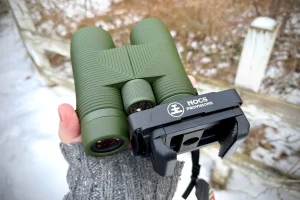
Begin by placing the smartphone adapteronto the binoculars’ eyepiece. Ensure it fits snugly to avoid slipping. Adjust the adapter’s clamp or screw to hold the phone securely. Align the phone’s camera lens with the binoculars’ lens for a clear view.
Double-check the fit to prevent movement during use. Tighten all screws carefully but not too tight to avoid damage. Use any included pads or cushions to protect your phone and binoculars from scratches.
- Hold binoculars firmly to prevent shaking.
- Use a tripod if available for better stability.
- Make sure the adapter and phone do not block the view.
- Practice holding the setup before taking photos or videos.
Aligning Your Smartphone With Binoculars
Adjust the adapter so your smartphone lenslines up with the binocular eyepiece. Tighten the clamps gently to hold the phone steady. Make sure the phone camera is centered to avoid blurry edges.
Check the phone screen to see the binocular view. Move the adapter slowly to find the sharpest image. Small changes can improve clarity.
- Use the phone’s camera app in manual focusmode if available.
- Adjust binocular focus to match your phone’s view.
- Keep the adapter steady to prevent shaking.
Good lighting helps to get a clear picture. Avoid bright light behind you to reduce glare. Look through the phone screen to confirm the view is sharp and well framed.
Capturing Images And Videos
Enhancing image qualityis key for better photos and videos. Use a smartphone adapter to connect the binoculars securely. Ensure the phone camera lens aligns perfectly with the binocular eyepiece. Clean both lenses to avoid blurry images. Adjust the focus on binoculars for a sharp view. Use natural light to improve clarity and color. Avoid digital zoom on your phone as it lowers image quality. A tripod helps keep the setup steady and prevents shaking. Try to hold your phone and binoculars still to get clear shots.
Recording techniquescan make your videos look great. Use the phone’s camera app in video mode. Tap the screen to focus on the subject before recording. Keep the binoculars steady during recording to avoid shaky footage. Record in short clips instead of long videos for easier editing. Use the volume button or a remote shutter to start and stop recording without moving your phone. Review your videos and adjust the settings or position if needed for better results.

Credit: gtguardhunt.com
Maintaining Your Equipment
Keep lenses clean by using a soft brush or lens cloth. Avoid harsh chemicals that may damage the coating. Use a blower to remove dust from delicate parts.
Store binoculars and adapters in a dry, cool place. Use a padded case to protect from bumps and scratches. Keep away from direct sunlight and moisture to prevent damage.
Troubleshooting Common Issues
Alignment problemsoften cause blurry or off-center images. Check if the smartphone camera lens lines up with the binocular eyepiece. Slight moves of the adapter can fix the view. Tighten all screws gently to keep the phone steady. Use a flat surface or tripod to hold the binoculars and phone still. This prevents shaking and misalignment during use.
Image distortionhappens if lenses are dirty or misaligned. Clean both binocular lenses and phone lens with a soft cloth. Avoid touching the glass with fingers. Adjust focus on both the binoculars and the phone camera. Try different zoom levels to find the clearest picture. Sometimes, moving the phone a little closer or farther helps fix distortion.

Credit: www.amazon.com
Expert Tips For Better Usage
Hold your binoculars steady to get a clear picture. Use a tripod or rest your arms on a solid surface. This helps stop shaking and makes images sharper. A smartphone adapter adds weight, so stability is key.
Adjust the adapter tightly to avoid any movement between the phone and binoculars. Check alignment often to keep the phone lens centered on the binocular eyepiece. Small shifts can blur photos.
- Use a tripod for steady shots.
- Keep hands close to your body for support.
- Lock the adapter firmly onto binoculars.
- Align phone lens carefully with binocular eyepiece.
- Use phone camera’s zoom feature instead of digital zoom.
Clean the lenses before use for clearer images. Adjust the focus of binoculars before snapping pictures. Good light helps your photos look bright and sharp.
Frequently Asked Questions
How Do I Attach A Smartphone Adapter To Tactical Binoculars?
To attach, align the adapter with your binoculars’ eyepiece. Secure it tightly using the adapter’s clamps or screws for stability. Ensure your phone camera lens fits perfectly with the adapter for clear images.
Can Smartphone Adapters Improve Binocular Photography Quality?
Yes, smartphone adapters enhance image stability and zoom precision. They reduce hand shake and align the phone camera accurately with binocular lenses. This results in sharper, clearer photos and videos through tactical binoculars.
What Types Of Smartphones Fit Tactical Binocular Adapters?
Most adapters fit popular smartphones, including iPhones and Androids. Always check adapter specifications for size compatibility. Adjustable adapters offer flexibility for various phone models and camera placements.
Are Tactical Binocular Smartphone Adapters Easy To Use?
Yes, they are user-friendly and require minimal setup. Simply mount the adapter, align your phone, and secure it. Practice a few times to achieve perfect alignment for the best shots.
Conclusion
Using tactical binoculars with smartphone adapters lets you capture clear, close-up photos. It helps you see distant objects and save images easily. Attach the adapter carefully and adjust the focus for best results. Practice a few times to get steady shots.
This combination suits outdoor activities like hiking, birdwatching, or sports events. Enjoy exploring the world through your phone and binoculars together. Keep your gear clean and safe for longer use. Simple steps bring great views right to your screen. Try it today and see the difference yourself.