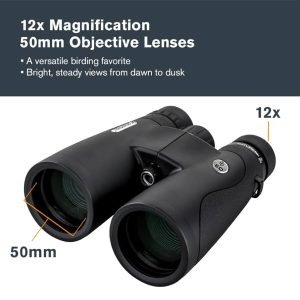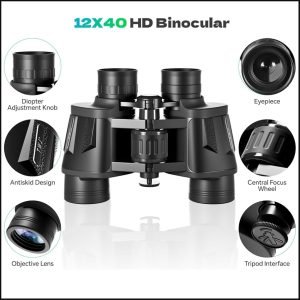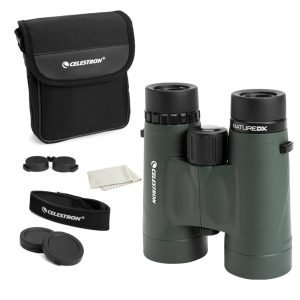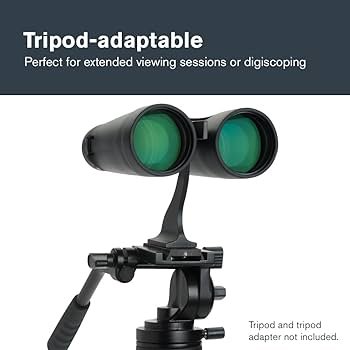
Are you struggling with blurry images when using your tripod compatible binoculars? It’s frustrating when you expect clear, sharp views but end up with fuzzy pictures instead.
The good news is, you don’t have to settle for this. With a few simple checks and tweaks, you can quickly fix the problem and enjoy crystal-clear sights every time. Keep reading to discover easy, step-by-step solutions that will sharpen your view and make your binocular experience truly satisfying.

Credit: www.celestron.com
Common Causes Of Blurry Images
Incorrect focus adjustmentoften causes blurry images. The focus ring might not be set properly. Slightly turn it until the image sharpens. Each eye may need individual focusing, especially if the binoculars have a diopter adjustment.
Lens dirt and smudgescan blur your view. Dust, fingerprints, or water spots reduce clarity. Use a soft cloth or lens cleaner to gently wipe the lenses. Avoid harsh rubbing or using rough materials.
Misalignment of opticsmeans the lenses are not in the correct position. This can cause double or blurry images. If shaking or dropping happened, the optics may need professional adjustment or repair. Some binoculars allow minor realignment by the user, but others require a technician.
Focus Adjustment Techniques
Use the focus knob gently to avoid sudden movements. Turn it slowly until the image becomes clear. Sometimes, blurry images happen because the knob is not centered. Try to find the middle point first, then adjust for sharpness.
Different distances need different focus settings. Close objects require more precise tuning. Far objects need less adjustment but careful attention. Remember, small turns can make big differences in focus clarity.
| Distance | Focus Adjustment | Tips |
|---|---|---|
| Close (under 10 meters) | Turn focus knob slowly | Make tiny adjustments for sharpness |
| Medium (10-50 meters) | Adjust focus knob moderately | Look for clear edges and details |
| Far (over 50 meters) | Turn focus knob lightly | Avoid over-turning to prevent blur |
Cleaning Lens For Clear Vision
Use a soft microfiber cloth for cleaning binocular lenses. This cloth removes dust without scratching the glass. Avoid using paper towels or clothing, as they can damage the lens surface. For stubborn smudges, use lens cleaning solution or distilled water. Spray the solution on the cloth, not directly on the lens. Gently wipe the lens in a circular motion to remove dirt and oils.
Safe cleaning practices protect your binoculars and extend their life. Always handle lenses with clean hands. Avoid touching the glass directly with fingers. Store binoculars in a protective case to keep dust away. Clean lenses only when necessary to prevent damage from over-cleaning.
| Tool | Use | Tip |
|---|---|---|
| Microfiber Cloth | Remove dust and light smudges | Use dry or slightly dampened with water |
| Lens Cleaning Solution | Clean stubborn stains and oils | Apply to cloth, not lens |
| Soft Brush or Blower | Remove loose particles before wiping | Use gentle strokes to avoid scratches |
Aligning Binocular Optics
Check if both barrels show the same image. If one looks blurry, the binoculars may be misaligned.
Hold the binoculars steady on the tripod. Look at a distant object with both eyes open.
Close one eye at a time. Notice if the images shift or blur. This helps find collimation issues.
- Loosen the center hinge slightly to adjust barrel alignment.
- Gently move barrels until images overlap perfectly.
- Tighten the hinge carefully without changing the alignment.
- Test the focus again with both eyes open.
- Repeat if images still look blurry or double.
Proper alignment improves clarity and comfort. Small adjustments make a big difference.
Impact Of Environmental Conditions
Humidity and fogcan cause lenses to fog up and blur images. Let binoculars adjust to the outdoor air before use. Wiping lenses gently with a soft cloth helps remove moisture. Store binoculars in a dry place with silica gel packs to reduce humidity. Avoid breathing directly on lenses.
Bright light and glare may strain your eyes and blur views. Use a sunshade or lens hood to block direct sunlight. Position binoculars so the sun is behind you. Polarized lens filters can reduce glare from water or glass surfaces. Adjust the tripod for steady and clear viewing.

Credit: gearjunkie.com
Choosing The Right Tripod
Stable supporthelps keep binoculars steady and clear. A good tripod reduces shaking, which causes blurry images. It makes viewing more comfortable for long periods. Using a tripod allows both hands free to adjust focus smoothly.
Look for tripods with these features:
- Strong build:Metal or sturdy plastic for firm hold.
- Adjustable height:Fits your eye level easily.
- Quick locking:Secure position fast.
- Tripod head:Smooth rotation and tilt for better aim.
- Portability:Light and easy to carry outdoors.
Regular Maintenance Tips
Regular checks keep binoculars sharp and clear. Look for dust, dirt, or smudges on lenses. Clean lenses gently with a soft cloth made for optics. Avoid using rough materials that can scratch the glass.
Check the tripod mount for tightness. Loose mounts can cause shaking and blur images. Tighten screws carefully to avoid damage. Test focus knobs to ensure smooth movement.
| Routine Inspection Checklist | Actions |
|---|---|
| Lens Cleanliness | Use a microfiber cloth to remove dust and smudges |
| Tripod Mount | Check and tighten screws for stability |
| Focus Mechanism | Turn knobs to ensure smooth operation |
| Body Condition | Inspect for cracks or dents that affect performance |
Long-term care means storing binoculars in a dry, cool place. Use a protective case to avoid dust and damage. Avoid exposing them to extreme heat or cold. Regularly check seals to keep moisture out.
Lubricate moving parts sparingly with proper oil. Avoid over-lubrication, which can attract dirt. Keep binoculars away from harsh chemicals to prevent damage.
Expert Recommendations
Professional binocular brandsoften offer better image clarity. Brands like Nikon, Bushnell, and Celestron have models compatible with tripods. These brands focus on optical qualityand durability. Many models come with adjustable focus and anti-reflective coatings. This helps reduce blurry images and eye strain. Choosing binoculars from trusted brands can save time and frustration.
User reviews often highlight common issues and fixes. Many users report blurry images caused by poor alignment or dirty lenses. Cleaning lenses with a soft cloth usually helps. Some users suggest checking the tripod mount for stability. Loose mounts can cause shaky, blurry views. Others recommend adjusting the focus slowly for sharper images.

Credit: www.amazon.com
Frequently Asked Questions
How Do I Fix Blurry Images On Tripod Binoculars?
Check the focus knob and adjust it slowly until the image clears. Ensure the binoculars are steady on the tripod. Clean the lenses with a soft cloth to remove dirt or smudges that may cause blurriness.
Why Are My Tripod Binocular Images Fuzzy Or Unclear?
Fuzziness often results from improper focus, shaky mounting, or dirty lenses. Adjust the focus carefully, secure the tripod firmly, and clean the lenses regularly to maintain a clear view.
Can Improper Tripod Setup Cause Blurry Binocular Images?
Yes, an unstable or incorrectly positioned tripod can cause vibrations leading to blurry images. Always ensure the tripod is sturdy and level to achieve sharp and stable views through your binoculars.
How Often Should I Clean Binocular Lenses For Clarity?
Clean binocular lenses before every use or whenever you notice dirt or smudges. Use a microfiber cloth and lens cleaner to avoid scratches and maintain optimal image quality.
Conclusion
Blurry images can spoil your viewing experience with tripod binoculars. Check the lens for dirt or smudges and clean gently. Adjust the focus knob slowly until the picture sharpens. Ensure the binoculars sit steady on the tripod without shaking. Try changing the distance between your eyes and the eyepieces.
Small fixes often solve the problem quickly. Keep your binoculars well-maintained to enjoy clear views every time. Clear, sharp images make outdoor adventures more enjoyable. Don’t let blurry views hold you back. Stay patient and keep adjusting. You will see better soon.