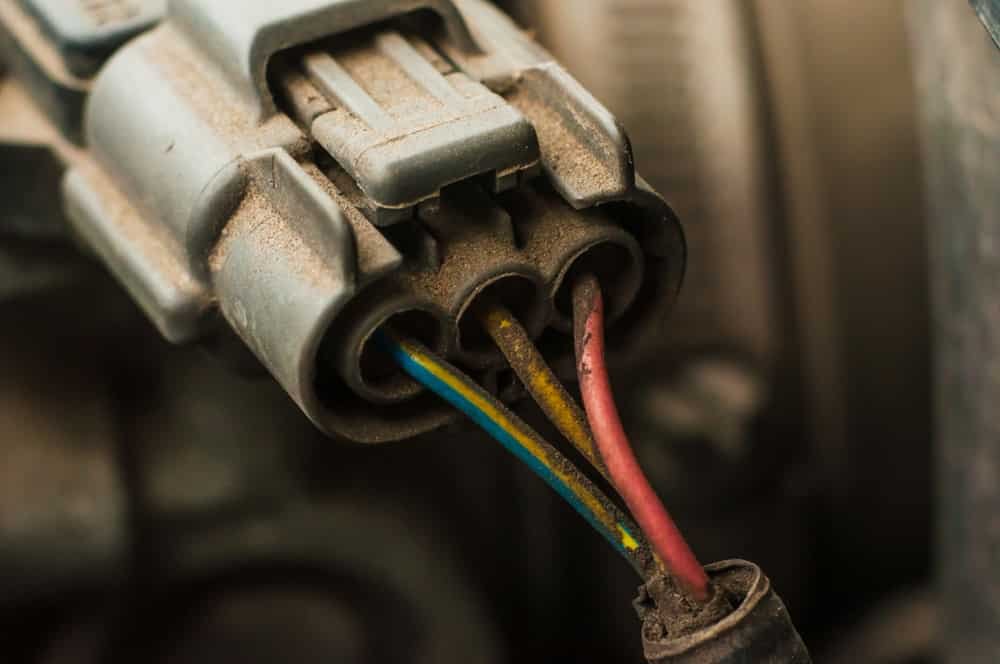
If you want your harness connectors to work smoothly and last longer, knowing how to maintain and clean them is key. Dirty or damaged connectors can cause frustrating problems, from poor connections to unexpected failures.
But don’t worry—this guide will show you simple, effective steps you can take right now to keep your connectors in top shape. By following these easy tips, you’ll save time, avoid costly repairs, and ensure your equipment runs reliably every time.
Ready to protect your gear and boost its performance? Let’s dive in.
Choosing The Right Tools
Essential cleaning supplies include contact cleaner spray, lint-free cloths, and small brushes. These help remove dirt and dust from harness connectors. Use compressed airto blow out debris from tight spots. Avoid water or harsh chemicals that can damage connectors.
Tools for inspection and repair include a multimeterto check for electrical continuity and a set of small screwdriversfor opening connector housings. A magnifying glasshelps spot cracks or corrosion. Use replacement pinsand a crimping toolto fix damaged wires or connectors.

Credit: www.facebook.com
Safety First
Always disconnect power sourcesbefore handling harness connectors. This prevents electric shocksand damage. Make sure the device is completely offand unplugged. Double-check with a voltage testerif needed. Never touch connectors with wet hands or near water.
Wear protective gearlike insulated gloves and safety glasses. This protects your hands and eyes from sparks or debris. Use gloves that fit well to keep good control. Safety shoes are also a good idea in work areas. Always keep your workspace clean and dry.
Step-by-step Cleaning Process
Begin by disconnecting the harness connectors carefully to avoid damage. Clean the contacts with a soft brush and mild cleaner to remove dirt. Dry completely before reconnecting to ensure proper function and prevent corrosion.
Removing The Connector
Disconnect the harness connector gently from its socket. Avoid pulling on wires; hold the connector body instead. Check for any locking tabs or clips and press them carefully. Keep the connector safe to prevent damage or dirt.
Cleaning Contacts And Pins
Use a soft brush or compressed air to remove dust and debris. For stubborn dirt, apply a small amount of isopropyl alcohol to a cotton swab. Clean each pin and contact carefully. Avoid bending or damaging the metal parts.
Drying And Reassembling
Let the connector air dry completely before reassembling. Do not use a cloth to dry; it may leave fibers. Once dry, reconnect the harness firmly. Ensure all clips or locks snap back securely to avoid loose connections.

Credit: www.analogictips.com
Preventing Damage
Corrosioncan damage harness connectors quickly. Keep connectors dry and clean. Use a small brush to remove dirt and debris gently. Avoid water or harsh chemicals that may cause rust. Applying a thin layer of dielectric greasehelps stop moisture from reaching metal parts. Store connectors in a dry place when not in use.
Handle connectors with care to avoid damage. Always hold by the plastic housing, not the wires. Avoid pulling on wires to disconnect. Make sure connectors line up correctly before joining. Use proper tools for insertion and removal to prevent bending or breaking pins.
Routine Maintenance Tips
Regular inspectionof harness connectors helps prevent failures.
Check connectors every monthor before any major use.
Look for these signs of wear and tear:
- Cracksor breaks in the plastic housing
- Corrosionon metal contacts
- Looseor bent pins
- Frayedor damaged wires
- Discolorationindicating heat damage
Early detection helps avoid costly repairsor accidents.
Troubleshooting Common Issues
Loose connectionscan cause devices to stop working properly. Check if connectors fit tightly in their ports. Gently push connectors back in to secure them. Dirt or dust inside connectors can block signals. Clean connectors with a soft brush or compressed air. Avoid pulling on cables to prevent damage.
Signal interferencemay disrupt communication between devices. Keep cables away from power lines and other electronics. Use shielded cables to reduce interference. Make sure connectors and cables are not bent or twisted. Replace damaged cables to improve signal quality.

Credit: www.facebook.com
Frequently Asked Questions
How Often Should I Clean Harness Connectors?
Clean harness connectors every 3 to 6 months or after exposure to dirt or moisture. Regular cleaning prevents corrosion and ensures proper electrical contact, extending the connector’s lifespan and maintaining safety.
What Tools Are Needed To Clean Harness Connectors?
Use a soft brush, isopropyl alcohol, compressed air, and lint-free cloth. These tools safely remove debris and moisture without damaging the connectors or their contacts.
Can I Use Water To Clean Harness Connectors?
Avoid using water as it can cause corrosion and short circuits. Instead, use isopropyl alcohol or specialized electrical contact cleaners for effective and safe cleaning.
How Do I Inspect Harness Connectors For Damage?
Look for cracks, corrosion, bent pins, or loose connections. Regular inspection helps detect issues early, preventing electrical failures and maintaining system reliability.
Conclusion
Maintaining harness connectors requires regular attention and simple steps. Clean them gently using a soft brush and mild cleaner. This prevents dirt build-up and ensures proper functioning. Inspect connectors for damage or wear often. Replace any faulty parts promptly. Proper care extends their lifespan and keeps systems running smoothly.
Always store connectors in a dry place. Protect them from moisture and extreme temperatures. This keeps them reliable and efficient. Follow these steps consistently. Your equipment will stay in top shape. Enjoy hassle-free operation and long-lasting performance. Harness connectors will serve you well with careful handling.