Imagine you’re out in the wild, trying to catch a glimpse of a rare bird or a distant landmark. You’re excited, but every time you lift your monocular to your eye, the image seems shaky and unclear.
Frustrating, isn’t it? This is where image stabilization comes into play, making your viewing experience smooth and enjoyable. But how exactly does this technology work in monoculars? Understanding this could transform how you explore the world around you, allowing you to see it with clarity and precision.
Dive into the mechanics of image stabilization to ensure your next adventure is filled with vivid and stable images. Curious to learn more? Keep reading to uncover the secrets of how this technology enhances your viewing experience.
Basics Of Image Stabilization
Image stabilizationhelps keep the view steady in monoculars. It reduces the blur caused by hand movements or shaking. This is very important when looking at distant objects, as even small shakes can make the image blurry or hard to see.
Stabilization lets you see clear and sharp images without needing extra support. It makes using monoculars easier, especially for long observation times or in moving situations like on boats or cars.
- Optical Stabilization:Moves lenses inside the monocular to cancel shakes.
- Electronic Stabilization:Uses sensors and software to adjust the image digitally.
- Gyroscopic Stabilization:Uses small gyroscopes to detect and reduce motion.
Mechanics Behind Stabilization
Gyroscopic sensorsdetect small movements or shakes. They send signals to the stabilization system quickly. This helps keep the image steady even if your hand moves.
The lens shift mechanismmoves lenses inside the monocular. It corrects the image by shifting lenses opposite to the shake. This action helps produce a clear, stable view.
Electronic stabilization methodsuse tiny motors and software. These adjust the image on the screen in real time. The system reacts fast to reduce blur and keep the view steady.
Image Stabilization In Monoculars
Integrating image stabilizationin monoculars faces many challenges. The small size limits space for parts. Stabilization needs extra sensors and motors. These parts must fit inside a compact body without adding much weight.
Power use is another concern. Stabilization needs energy to work, which can drain batteries quickly. Designers must find ways to save power while keeping performance high.
Here is a simple table showing common integration challengesand possible solutions:
| Challenge | Solution |
|---|---|
| Limited space | Use smaller, lightweight components |
| Battery life | Optimize power consumption |
| Weight increase | Use light materials |
| Complex design | Integrate parts efficiently |
Compact design solutions focus on miniaturizing partsand smart layouts. Some use gyroscopesto detect shake and adjust lenses fast. Others use electronic systems to keep the image steady. These help keep monoculars small and easy to carry.
Benefits Of Stabilized Monoculars
Stabilized monoculars give a clearer and sharper image. They reduce the blur caused by hand movements or shaking. This improves image clarity, making it easier to see details far away.
Using stabilized monoculars also reduces eye strain. The steady image means your eyes do not have to work hard to focus. This makes viewing more comfortable, especially for long periods.
- Clear imageswith less shaking
- Easier to focuson distant objects
- Less tired eyesafter use
- Better for watching wildlife, sports, or scenery
Comparing Stabilized Vs Non-stabilized Monoculars
Stabilized monocularsreduce hand shake and vibrations. This gives a clearer and steadier view. Non-stabilized ones show more blur when your hands move. This can make seeing details hard.
Stabilized models often weigh more and cost more. Non-stabilized are lighter and cheaper. But, they need a steady hand or a tripod to work well.
| Feature | Stabilized Monoculars | Non-Stabilized Monoculars |
|---|---|---|
| Image Clarity | Clearer, less shake | Blurrier with hand movement |
| Weight | Heavier | Lighter |
| Price | More expensive | Less expensive |
| Best Use | Walking, moving, boat trips | Stable spots, tripod use |
- Stabilized monoculars work well for hikers and boaters.
- Non-stabilized fit bird watchers in one spot.
- Stabilized helps in low light or at high zoom.
- Non-stabilized are good for quick, simple views.

Credit: www.amazon.com
Choosing The Right Stabilized Monocular
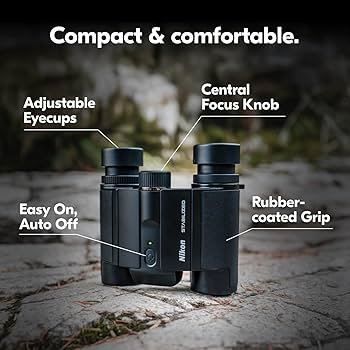
Choosing the right stabilized monocular means checking some key features. Size and weight matter for easy carrying. A compact monocular fits well in your hand or bag. Optical quality is very important. Look for clear lenses with good magnificationand field of view. Image stabilization strength also varies. Stronger stabilization helps reduce shaking more. Battery life affects how long you can use it without charging. Some models offer longer use time than others.
| Feature | Why It Matters | What to Look For |
|---|---|---|
| Size & Weight | Easy to carry and use | Lightweight, compact design |
| Optical Quality | Clear, sharp images | High magnification, wide field of view |
| Stabilization Power | Reduces hand shake | Strong, reliable stabilizer |
| Battery Life | Long usage time | Hours of operation per charge |
Budget is key. Stabilized monoculars come in many price ranges. Cheaper models may have basic features. Higher-priced ones offer better optics and stronger stabilization. Trusted brands often provide better quality and support. Reading reviews helps choose the best option. Balance price with needed features to find a good fit.
Maintaining Your Stabilized Monocular
Keep your stabilized monocular clean and dry for best use. Use a soft cloth to wipe lenses gently. Avoid touching lenses with fingers to stop smudges. Store the monocular in a protective case to prevent dust and scratches. Remove batteries if the device won’t be used for long time. Check battery levels often to keep image stabilization active.
- Wipe lenses with a microfiber cloth only.
- Keep device away from water or heavy moisture.
- Use fresh batteries to avoid power issues.
- Store in a cool, dry place.
| Problem | Possible Cause | Solution |
|---|---|---|
| Blurred image | Dirty lens or low battery | Clean lens, replace battery |
| Shaky view | Image stabilization off or weak battery | Turn stabilization on, check battery |
| Device won’t turn on | Dead battery or loose connection | Change battery, check battery contacts |

Credit: westernhunter.net

Credit: www.youtube.com
Frequently Asked Questions
What Is Image Stabilization In Monoculars?
Image stabilization in monoculars reduces hand shake and vibrations. It uses gyroscopes or sensors to detect movement and adjusts lenses. This technology ensures a clear, steady view even at high magnifications or in shaky conditions.
How Does Image Stabilization Improve Viewing Quality?
It minimizes blur caused by hand movements and external vibrations. This results in sharper, clearer images. Users can observe distant objects comfortably without strain or constant refocusing.
Are Electronic And Optical Stabilization Different?
Yes, electronic stabilization uses software to correct images digitally. Optical stabilization physically moves lens elements to counteract shake. Optical stabilization generally provides clearer and more natural views.
Can Image Stabilization Work In All Monocular Models?
No, only specific monoculars feature image stabilization technology. Higher-end or specialized models often include this feature. Always check product specifications before purchasing.
Conclusion
Image stabilization in monoculars helps you see steady views. It reduces shaking from hand movements or wind. This technology uses sensors and tiny motors to keep images clear. You can enjoy better focus even at high zoom levels. Stable images make spotting details easier and more comfortable.
Choosing monoculars with image stabilization improves your outdoor experience. It brings sharper, smoother views wherever you go. Understanding how it works helps you pick the right tool. A steady view makes every adventure more enjoyable and successful.