Are you struggling to get steady, clear photos through your tripod-compatible binoculars using your smartphone? Attaching a smartphone adapter might sound tricky, but once you know the simple steps, you’ll capture amazing shots with ease.
In this guide, you’ll learn exactly how to connect your smartphone to your binoculars securely, so you can enjoy hands-free viewing and sharp images every time. Keep reading, and soon you’ll be sharing stunning photos that others will envy.
Choosing The Right Smartphone Adapter
Check if the adapter fits your smartphone model and binocular size. The adapter must hold your phone securely without slipping. Look for adapters designed for your binocular’s eyepiece diameter.
Important features include:
- Adjustability: The adapter should adjust to different phone sizes and binoculars.
- Durability: Choose materials like metal or strong plastic for stability.
- Ease of Use: Quick setup and removal save time in the field.
- Lightweight: A heavy adapter can unbalance the tripod setup.
- Compatibility: Works with your tripod and binocular brand.
Preparing Your Tripod-compatible Binoculars
Check that your binoculars have a tripod adapter socket. This is usually a small hole on the body. It allows attachment to a tripod or adapter.
Make sure the adapter fits your binoculars’ socket size. Some adapters come with different screws for various sizes. Using the correct screw ensures a tight fit.
Before attaching, clean the socket and adapter threads. Dirt or dust can make the connection loose or unstable.
When attaching, align the adapter carefully with the socket. Turn the screw slowly and tighten it until secure. Avoid over-tightening to prevent damage.
To secure the binoculars on the tripod adapter:
- Place the binoculars on the tripod mount plate.
- Use the locking mechanism on the adapter to hold the binoculars in place.
- Check for wobbling and adjust the tightness if needed.
Attaching The Smartphone Adapter
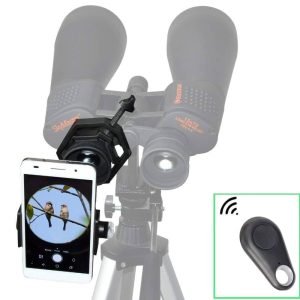
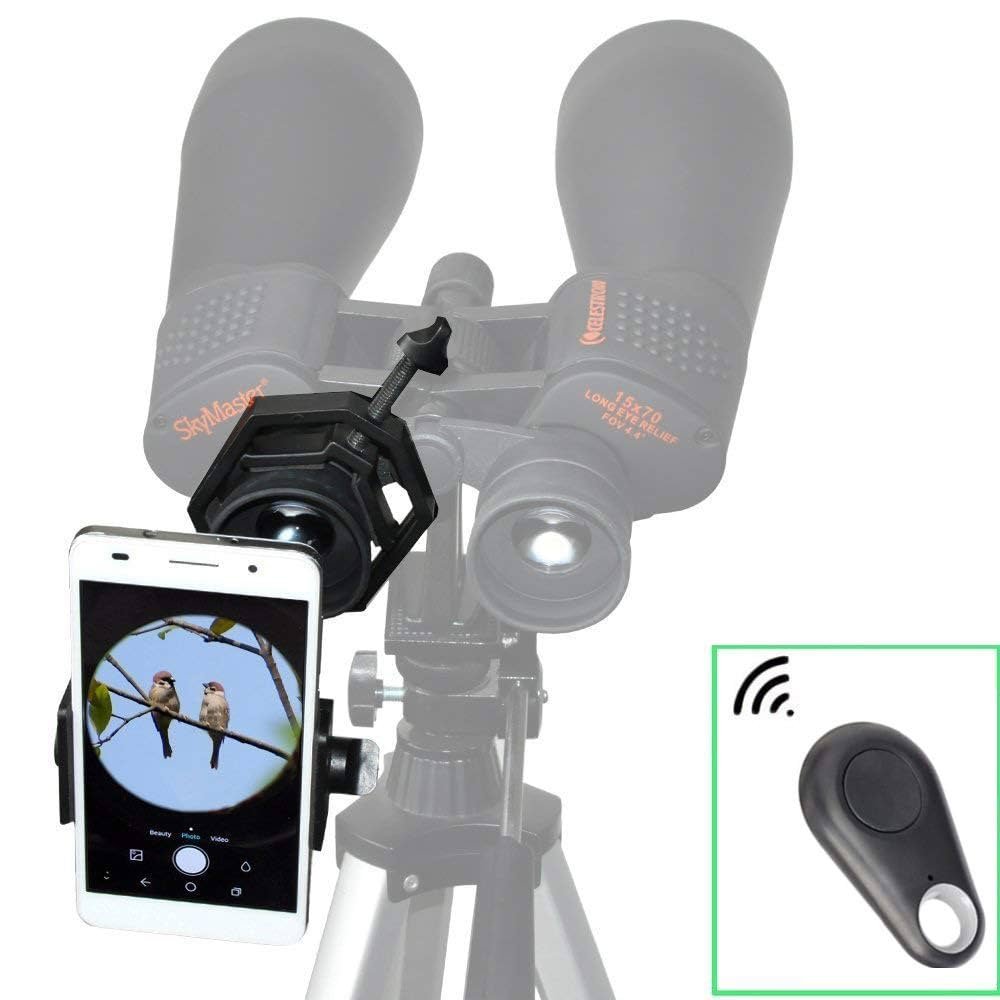
Place the smartphone adapter close to the binocular eyepiece. Align the adapter lenscarefully with the binocular’s eyepiece lens. This ensures clear and sharp images. Make sure the adapter does not cover any part of the binocular’s view.
Secure the adapter by tightening the clamps or screws. Check that the adapter fits snugly and does not move. A loose adapter can cause blurry photos or damage your phone. Use gentle pressure to avoid breaking any parts.

Credit: www.amazon.com
Adjusting For Optimal Viewing
Adjust the smartphone adapter so the lens lines up perfectly with the binocular eyepiece. Small movements can make a big difference in clarity. Check the screen to see if the image is centered and sharp. Rotate or slide the adapter slightly until the view is clear and fills the screen.
Use the tripod’s adjustment knobs to steady the binoculars and adapter. Keep the setup tight to avoid shaking. A stable setup ensures smoother photos and videos. Double-check all connections and make sure nothing wiggles.
Testing And Troubleshooting
Start by taking a few test shots to check the setup. Make sure the smartphone adapter is securely attachedto the tripod and binoculars. Use steady hands or a stable surface to avoid blurry images. Adjust the focus on both the binoculars and the phone camera for clear pictures.
Common issues may include:
- Blurry images:Check if the adapter is tight and lenses are clean.
- Misalignment:Ensure the phone camera lens lines up with the binocular eyepiece.
- Shaky shots:Use a tripod or place the setup on a flat surface.
- Dark photos:Increase lighting or adjust camera settings.
Try small adjustments, retake photos, and repeat until images look sharp. Patience helps in perfecting the setup.
Credit: www.greensafaris.com
Maintenance Tips
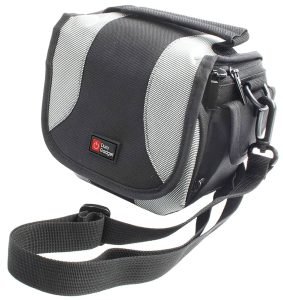
Use a soft cloth to clean lenses gently. Avoid harsh chemicals that may damage lens coatings. Use a small brush or air blower to remove dust and dirt from crevices. Clean the adapter and tripod parts with a dry cloth to prevent rust. Store binoculars and adapters in a protective case to avoid scratches and dust buildup.
Keep equipment in a cool, dry place. Avoid leaving them in direct sunlight or damp areas. Use silica gel packets in storage cases to control moisture. Check equipment regularly for any signs of damage or wear. Proper care helps your gear last longer and work better.

Credit: www.amazon.com
Frequently Asked Questions
How Do I Attach A Smartphone Adapter To Binoculars?
First, align the adapter with the binocular eyepiece. Secure it firmly using the provided clamps or screws. Ensure the smartphone camera lens aligns with the binocular eyepiece for a clear image. Tighten all parts to prevent movement during use.
What Tools Are Needed For Attaching A Smartphone Adapter?
Most smartphone adapters come with all necessary tools, like clamps or screws. Usually, no additional tools are required. A small screwdriver might help for fine adjustments. Always check the adapter instructions before starting the installation.
Can Any Smartphone Fit With Binocular Adapters?
Adapters are generally adjustable to fit most smartphones. However, extremely large or thick phone cases might cause fitting issues. Always check the adapter’s compatibility list for your phone model. Removing bulky cases can help achieve a secure fit.
How To Align The Smartphone Camera With Binocular Eyepiece?
Place the adapter on the binocular eyepiece first. Then, position your smartphone so its camera lens aligns perfectly with the eyepiece lens. Use the adapter’s adjustment knobs or clamps to fine-tune the alignment. Proper alignment ensures sharp, focused photos or videos.
Conclusion
Attaching a smartphone adapter to tripod-compatible binoculars is simple. Secure the adapter firmly to avoid shaky images. Align your phone camera with the binocular lens carefully. Tighten all screws to keep the setup stable. Test your setup by taking a few photos.
Adjust the focus for clear, sharp pictures. Enjoy capturing distant views with ease. Practice a few times to get comfortable. This setup helps you share your outdoor experiences. Keep your equipment safe and clean after use. Now, you are ready for better binocular photography.