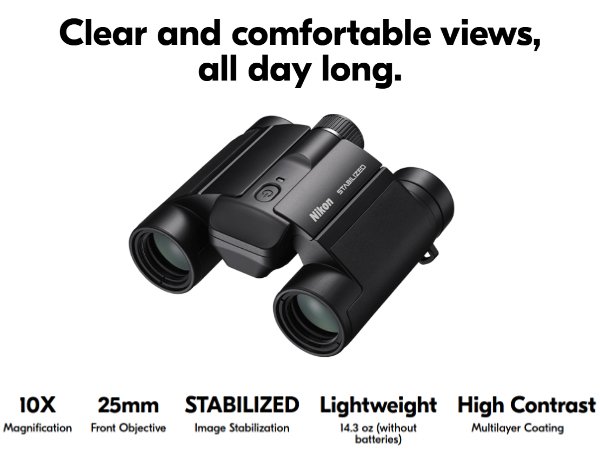
Are your image stabilized binoculars not working as smoothly as before? It might be time to replace the batteries.
Knowing how to properly change the batteries can save you money and keep your view clear and steady. In this guide, you’ll learn simple, step-by-step tips to replace your batteries quickly and safely. Keep reading to make sure your binoculars stay sharp and ready for every adventure.
Tools Needed
Replacing batteries in image stabilized binoculars needs a few basic tools. These tools make the job easier and prevent damage.
- Small screwdriver:Usually Phillips or flathead, to open battery compartments.
- New batteries:Check the correct size and type for your binocular model.
- Soft cloth:To clean the binoculars and avoid scratches.
- Gloves:Optional, to keep fingerprints off lenses and batteries.
- Tweezers:Helpful for removing old batteries carefully.
Having these tools ready before starting saves time. It also helps keep the binoculars in good shape.

Credit: www.amazon.com
Safety Precautions
Always turn offthe binoculars before opening the battery compartment. This prevents damage to the deviceand protects your safety. Use a clean, dry cloth to wipe the area around the battery compartment. Avoid touching the battery terminals with wet or dirty hands. Keep batteries away from children and pets. Use only the correct battery typerecommended by the manufacturer. Dispose of old batteries properly; do not throw them in fireor water. Avoid mixing old and new batteries or different brands. Replace batteries in a dry placeto prevent moisture damage. If you see any leakage or corrosion, clean it carefully with a cloth and avoid direct contact with skin. Store spare batteries in a cool, dry place away from direct sunlight.
Locating The Battery Compartment
The battery compartmentis usually found near the center or side of the binoculars. It may have a small cover or capthat you can slide or twist open. Look for a small latch or buttonthat releases the battery door. Sometimes, the compartment is hidden under a rubber or plastic part. Check the user manualfor exact location details. If you cannot find it, try gently feeling around the binoculars for a section that moves or opens.
Be careful not to force anything open. The compartment should open easily with a little pressure or twist. Keep a small coin or screwdriverhandy, as some compartments need a tool to open. Always open the battery compartment on a clean, flat surface to avoid losing small parts.

Credit: www.amazon.com
Removing The Old Batteries
Turn the binoculars upside down to find the battery compartment. Look for a small latch or cover that holds the batteries in place. Press or slide the latch gently to open the compartment without forcing it. Use a soft cloth to avoid scratches while opening. Remove the old batteries carefully, noting how they are placed inside. Dispose of old batteries safely according to local rules. Avoid touching battery terminals to prevent damage or corrosion. Clean the compartment with a dry cloth if needed before inserting new batteries.
Choosing The Right Batteries
Choosing the right batteriesis key for image stabilized binoculars. These devices often need specific battery typesfor optimal performance. Common options include AA, AAA, or lithium batteries. Always check the user manualbefore buying. Use batteries that fit correctlyin the compartment to avoid damage.
Rechargeable batteriesare a good choice for frequent use. They save money and reduce waste. But ensure they are fully charged before use.
| Battery Type | Pros | Cons |
|---|---|---|
| Alkaline | Cheap, easy to find | Shorter life, not rechargeable |
| Lithium | Long-lasting, lightweight | More expensive |
| Rechargeable NiMH | Reusable, eco-friendly | Needs charger, initial cost |

Credit: www.amazon.com
Installing New Batteries
Open the battery compartment carefully to avoid damage. Check the type of batteries needed and buy the correct size and brand. Remove old batteries gently and dispose of them properly. Insert new batteries in the right direction, matching the plus (+) and minus (-) signs. Close the compartment securely to keep the batteries in place. Test the binoculars to ensure they turn on and stabilize the image. If they do not work, recheck battery placement or try fresh batteries. Keep batteries away from water and extreme heat to extend their life.
Testing The Binoculars
Check the power switch to ensure the binoculars turn on. Look through the lenses while holding the binoculars steady. The image should be clear and stable. If the image shakes or blurs, the batteries might be weak or dead.
Test the binoculars in a well-lit area. Move the binoculars slowly to see if the image stabilizes quickly. Listen for any unusual sounds from the device, like clicking or buzzing.
- Check battery contacts for dirt or corrosion.
- Replace batteries if the image is shaky or dim.
- Use fresh batteries that match the recommended type.
- Turn off the binoculars when not in use to save power.
Maintenance Tips
Always use the correct battery type for your binoculars. Check the user manual for battery size and specifications. Open the battery compartment gently to avoid damage. Remove the old batteries carefully, noting their orientation. Insert new batteries with the positive and negative ends aligned properly. Close the battery compartment securely to prevent moisture entry. Clean battery contacts with a dry cloth to maintain good connection. Store extra batteries in a cool, dry place. Avoid mixing old and new batteries or different brands. Regular battery checks help keep image stabilization working well.
Frequently Asked Questions
How Do I Open The Battery Compartment On Image Stabilized Binoculars?
Locate the battery compartment, usually on the side or bottom. Slide or unscrew the cover gently to access the batteries. Refer to your binoculars’ manual for specific instructions to avoid damage.
What Type Of Batteries Do Image Stabilized Binoculars Use?
Most use AA or AAA batteries, either alkaline or rechargeable. Check your binoculars’ manual to confirm the correct type and avoid compatibility issues or damage.
How Often Should I Replace Batteries In Stabilized Binoculars?
Battery life varies with usage, but typically replace every 10-20 hours. Carry spare batteries during long trips to avoid interruption in image stabilization.
Can I Use Rechargeable Batteries In Image Stabilized Binoculars?
Yes, rechargeable batteries like NiMH are suitable and eco-friendly. Ensure they match the required voltage and size for optimal binocular performance.
Conclusion
Replacing batteries in image stabilized binoculars keeps your view steady and clear. Always use the right battery type for best results. Handle the batteries carefully to avoid damage. Clean contacts if the device doesn’t turn on. Regular battery checks prevent unexpected power loss.
Now, enjoy your binoculars without interruption. Simple steps make a big difference. Stay prepared and keep your gear ready for any adventure.